
GPT Image 2 / 2.5 Image Generation API
¶ 1. Get an API Key
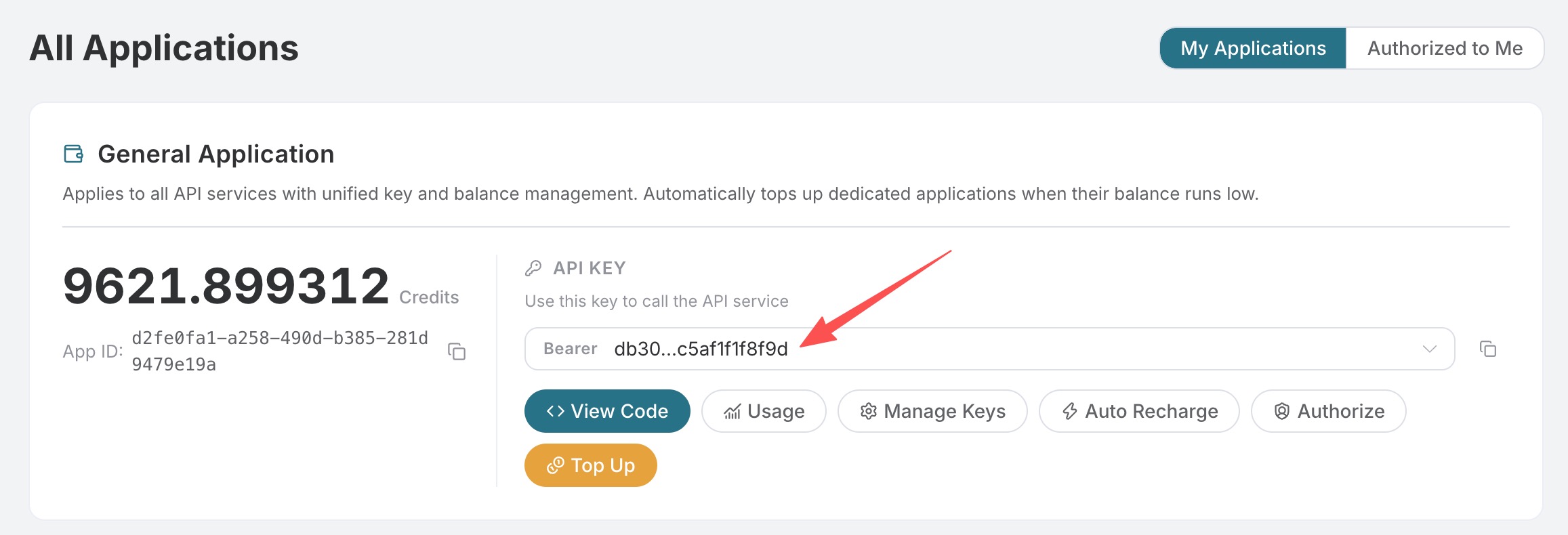
Open the Fishapi Cloud application list, enter an available application, and copy the API Key.
¶ 2. Send the First Request
curl https://api.fishapi.cloud/openai/images/generations \
  -H "Authorization: Bearer your API Key" \
  -H "Content-Type: application/json" \
  -d '{
    "model": "gpt-image-2",
    "prompt": "Minimal editorial product illustration: one plain white ceramic coffee mug centered on a solid cobalt blue tabletop, pale cream background, soft shadow, clean geometric shapes, no text, no logo, portrait composition",
    "size": "1024x1536"
  }'
The image in a successful response is located at data[].url. Below is the 1024×1536 result actually requested through Fishapi Cloud on September 8, 2026 (task d56455e2-e7f7-4bcd-b935-475b0a1e0948, trace eb938601-8192-407f-b539-1e0554b697ec):

¶ 3. Common Parameters
| Field | Description |
|---|---|
model |
gpt-image-2 (recommended by default), gpt-image-2.5-flare (faster), or gpt-image-2.5-sunburst (higher fidelity and control); all three can use their corresponding :official variants, and gpt-image-2 also supports :reverse |
prompt |
Image description, up to 32,000 characters |
size |
auto or WIDTHxHEIGHT; width and height must be multiples of 16, the longer side must not exceed 3840, total pixels must be 655,360–8,294,400, and the aspect ratio must not exceed 3:1 |
n |
1–10; only 1 is supported when response_format=b64_json |
quality |
GPT Image models support auto, low, medium, high; only 2.5 Flare / Sunburst (including :official) additionally support xhigh, max. Official channels are billed by actual Token usage |
response_format |
url or b64_json |
callback_url |
Optional; sends results to this address after a long task is completed |
Common sizes:
| Ratio | 1K | 2K | 4K |
|---|---|---|---|
| 1:1 | 1024x1024 |
2048x2048 |
2880x2880 |
| 4:3 | 1536x1024 |
2048x1536 |
3264x2448 |
| 3:4 | 1024x1536 |
1536x2048 |
2448x3264 |
| 16:9 | 1792x1024 |
2048x1152 |
3840x2160 |
| 9:16 | 1024x1792 |
1152x2048 |
2160x3840 |
size: "auto" selects the canvas based on the aspect ratio, pixels, and layout intent in the prompt; directly specify dimensions when exact pixels are needed.
¶ Models and Billing Methods
| Model | Use Cases and Billing Methods |
|---|---|
gpt-image-2 |
Default reverse channel, fixed billing per successfully generated image |
gpt-image-2:reverse |
Explicitly selects the reverse channel, fixed billing per successfully generated image |
gpt-image-2:official |
Official API channel, higher stability, billed by actual Token usage |
gpt-image-2.5-flare |
Focuses on generation speed, fixed billing per successfully generated image |
gpt-image-2.5-flare:reverse |
Explicit reverse alias, equivalent to gpt-image-2.5-flare, fixed billing per successfully generated image |
gpt-image-2.5-flare:official |
Official API channel, higher stability and focused on generation speed, billed by actual Token usage |
gpt-image-2.5-sunburst |
Focuses on high fidelity and fine-grained control, fixed billing per successfully generated image |
gpt-image-2.5-sunburst:reverse |
Explicit reverse alias, equivalent to gpt-image-2.5-sunburst, fixed billing per successfully generated image |
gpt-image-2.5-sunburst:official |
Official API channel, higher stability and focused on high fidelity and fine-grained control, billed by actual Token usage |
Reverse models (including :reverse aliases) may use GPT Image 2.5 Flare to complete requests during automatic recovery; the requested model and fixed billing method per successfully generated image remain unchanged.
The page price for official API channels is an estimate before the request; the final amount is based on actual Token usage and usage records in the response.
¶ 4. Multiple Image Generation
curl https://api.fishapi.cloud/openai/images/generations \
  -H "Authorization: Bearer your API Key" \
  -H "Content-Type: application/json" \
  -d '{
    "model": "gpt-image-2",
    "prompt": "A small fox reading under a glowing mushroom, watercolor illustration",
    "size": "1536x1024",
    "n": 2
  }'
gpt-image-2, gpt-image-2.5-flare, gpt-image-2.5-sunburst, and their :reverse aliases are billed by the number of successfully generated images; gpt-image-2:official, gpt-image-2.5-flare:official, and gpt-image-2.5-sunburst:official are billed based on the actual text input and image output Tokens in the response. The page price is an estimate before the request, and the final amount is based on usage records.
¶ 5. Asynchronous Callback
After adding callback_url to the request body, the API first returns {"task_id": "..."}, and POSTs the final result to that URL upon completion; synchronous requests still return created and data:
{
  "model": "gpt-image-2",
  "prompt": "A product poster with clear typography",
  "size": "1024x1024",
  "callback_url": "https://example.com/webhooks/images"
}
The callback receiver should use task_id for deduplication and validate the request source and data format.
¶ 6. Troubleshooting
| Status | Check |
|---|---|
| 400 | The combination of model, prompt, size format, n, and response_format |
| 401 | Whether the API Key is complete and the Header is Authorization: Bearer ... |
| 429 | Requests are too frequent; retry later |
| 504 | Synchronous generation timed out; use callback_url |
Error responses include error.code, error.message, and trace_id. When reporting an issue, provide the trace_id, but do not provide the API Key.
For complete fields and real-time enumerations, refer to the OpenAI Images Generations API page. For image editing, please see GPT Image 2 / 2.5 Image Editing.